Sumbarometer
Via management > barometers you can add (automatic) sumbarometers. A sumbarometer automatically adds barometers together. For example, a total barometer (of a company with more branches).
You can do almost everything that you can do with a regular barometer, such as viewing graphs (including normalizing and showing the benchmark, publishing footprint, fine-tuning key figures, adjusting report, setting goals, etc.
Filling in the functionality (including finetuning, making notes, choosing units) is not usable in the sum barometer.
- The finetuning of the sumbarometer automatically decreases if the data in all source barometers is finetuned.
- If you have set different CO₂ factors for the same item in different barometers (such as with ‘Other CO₂ sources’), it calculates an average CO₂ factor for (automatic) sumbarometers.
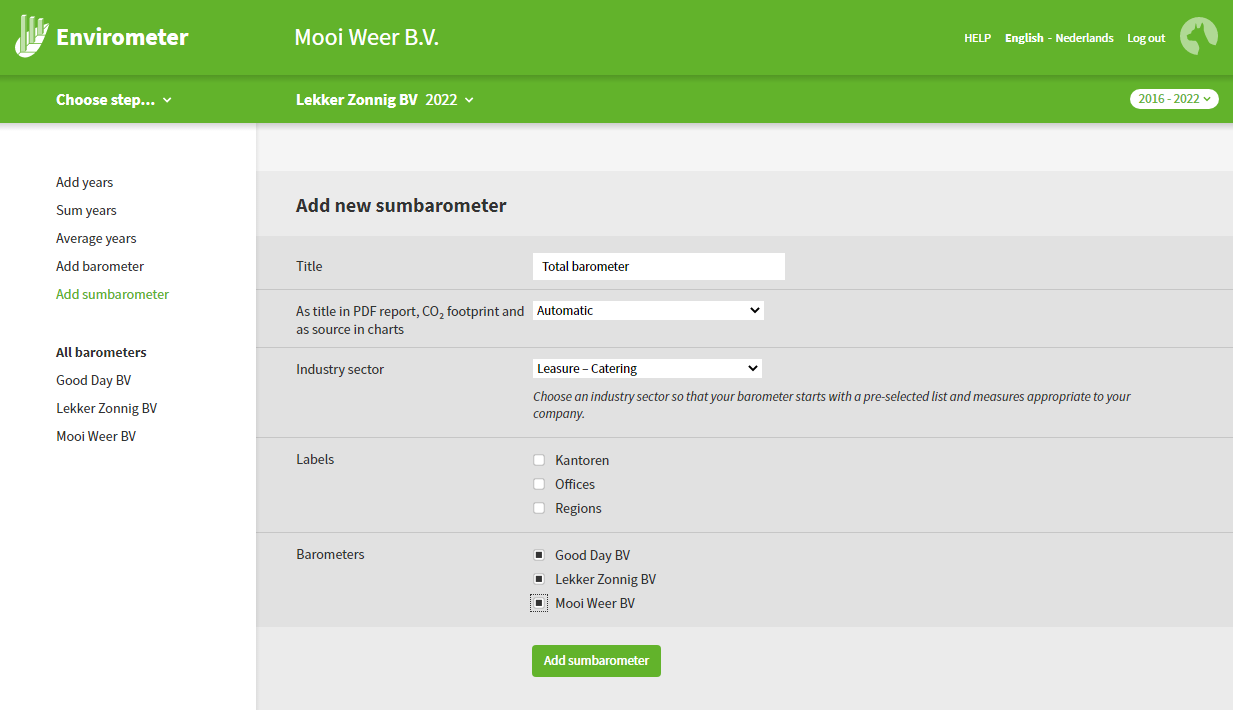
Add sumbarometer
Start in Administration > Add sumbarometer.
- The first (automatic) sumbarometer is free, if you want to use more sumbarometers you have to expand your subscription.
- The most important choice you make is which barometers you add (at least 2).
- You cannot add automatic sumbarometers into a new automatic sumbarometer.
- You can add barometers of which the years have been made with the existing (manual) sum function
Three functions are particularly useful for subscriptions with multiple Envirometers. These functions are found at the top left under Manage > Envirometers.
Add years: This lets you add a new year to one or more Envirometers. If the year already exists in an Envirometer, it will not be added there.
Add up years: This lets you add up all Envirometer years, useful for adding up all branches to calculate a total for the entire organization.
Year averages: This lets you calculate an average for different branches and/or years.
- A created sumbarometer can be recognized by the plus symbol in front of the name of the sumbarometer.
Created sumbarometers are also always at the bottom of lists, such as in the barometer overview.
Manage/change (automatic) sumbarometer
Start in Administration > All Barometers.
Click on the sumbarometer (indicated by the plus symbol) at the bottom of the list of barometers:
- You can now see how many source barometers the sumbarometer consists of.
- You can now see how many source years are used in calculations.
- You can now adjust the sumbarometer via the Change button.
- You can now also give other users access to the (new) sum barometer via the rights button.